
Live credit card spending total
Every charge counted the moment it happens.
Your bank balance lags by days. LiveSpend updates the second you pay.
Subscription required. Subscribe only in the iPhone app. Monthly or Yearly.
Existing account? Sign in on the web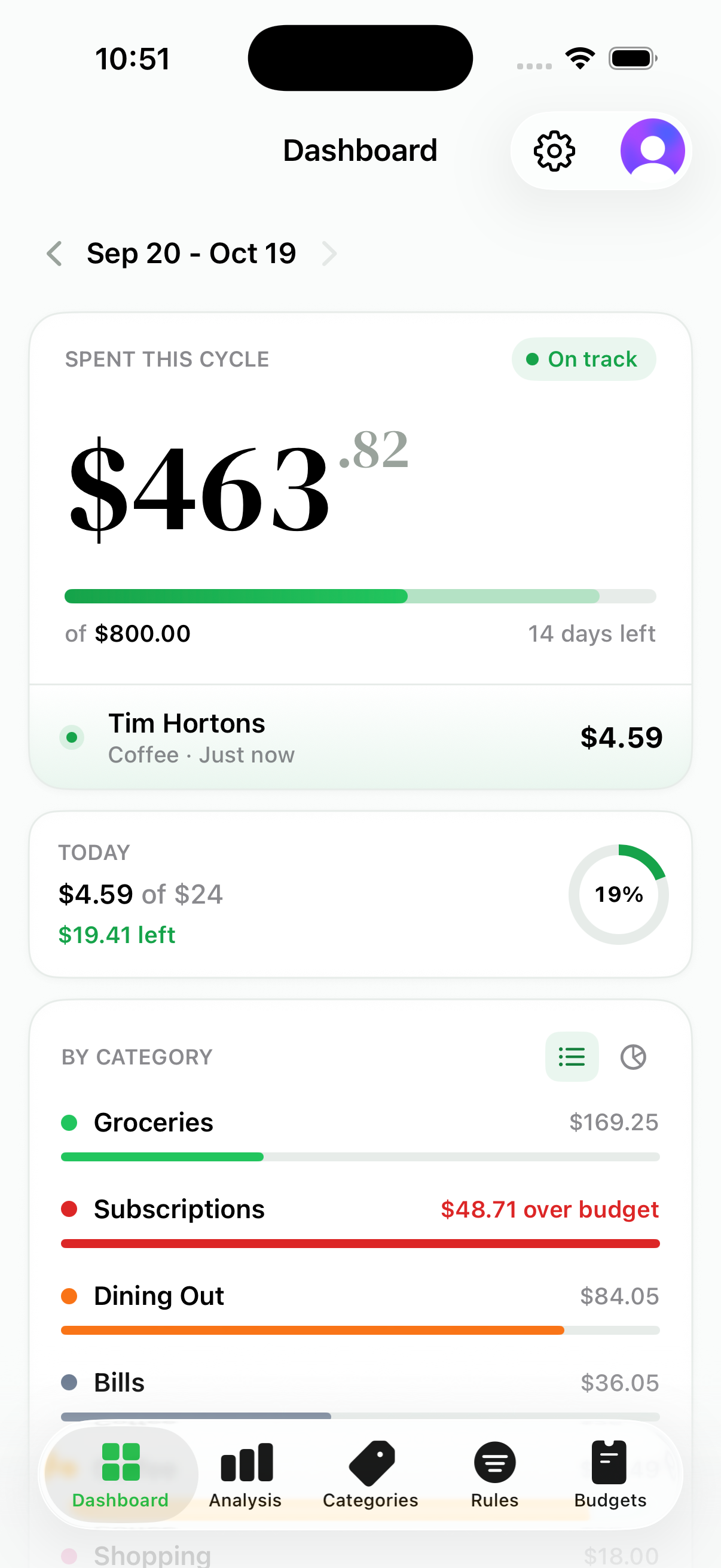
Subscription required. Subscribe only in the iPhone app. Monthly or Yearly.
Existing account? Sign in on the webLiveSpend is a real-time credit card spending tracker built for Canada. It uses your bank's email transaction alerts to show each purchase the moment it happens, so you always know what you have actually spent, without waiting days for transactions to post.
Everything is built around spending awareness: a live total, spending pace, forecasts, automatic categories, and the patterns behind your habits.
Enable email purchase alerts for your credit card, once.
Choose Gmail or Microsoft email. LiveSpend checks for your bank's alerts but cannot send, edit, or delete email.
Every charge lands in LiveSpend the second your bank sends its alert, not days later.
No bank alerts yet? LiveSpend guides you through the one-time setup. See exactly how it works.
Every charge counted the moment it happens.
See where the cycle is heading before it ends.
Every charge arrives already sorted.
See patterns across days and cycles.
Give each cycle and category a clear limit.
Your spending patterns, noticed for you.
Track upcoming charges and catch price changes.
The spending style behind your numbers.
Hear about the spending that matters to you.
Two billing options. Choose Monthly or Yearly.
CA$9.99 / month
Billed monthly.
CA$49.99 / year
Billed yearly. CA$4.17/month equivalent.
Save 58% compared with 12 monthly payments.
Subscribe only in the iPhone app. Once subscribed, use the same LiveSpend account on iPhone and the web. Subscription terms.
Available credit, current balance, and statement balance each update on their own schedule, sometimes days apart, so none of them tells you what you have spent right now.
You see the purchase right away, days before it posts, so your spending picture is always current while the bank does its paperwork.
LiveSpend complements your bank app. Your issuer remains the source of truth for statements and the amount due.
RBC, Scotiabank, BMO, CIBC, and National Bank credit cards.
Connect the supported inbox that receives your bank's alert emails.
Debit and Interac e-Transfer activity are not tracked yet.
Use the native iPhone app or open LiveSpend in your browser.
LiveSpend is not available yet for AMEX, banks not listed above, Yahoo Mail, iCloud Mail, or other unsupported inboxes. See the full requirements.
Checks for your bank's transaction alerts. It cannot send, edit, or delete email.
You never enter online banking credentials into LiveSpend. Ever.
Turn off inbox sync in LiveSpend or revoke access through your Google or Microsoft account.
The Gmail integration passed a CASA Tier 2 security assessment.
Your data is yours. Limited service providers process it only as described in the Privacy Policy.
The connection is designed to be understandable, limited, and reversible. You always know what LiveSpend is authorized to access. Read about security and email access.
A purchase can be approved before it changes your current balance, and a payment can take time to restore available credit. Here is how to tell what is happening.
Read the guideYes. You can track credit card spending sooner with a manual log, an app that imports transactions, or bank transaction alerts. None is a final real-time bank record: timing depends on the issuer, pending transactions can change, and your statement remains authoritative. For eligible Canadian bank alerts, LiveSpend can update when a recognized alert reaches a connected Gmail or Microsoft inbox.
Read the guideThe best app depends on whether you want the fastest view of recent card purchases or a broader system for budgeting, accounts, investments, and long-term planning.
Read the guideNo. LiveSpend works from the transaction alert emails your bank sends, and you never enter your online banking credentials. There is no bank login, ever.
LiveSpend works with credit cards from RBC, Scotiabank, BMO, CIBC, and National Bank. Connect the Gmail, Google Workspace, or Microsoft email inbox that receives your alerts. Microsoft email includes Outlook.com, Hotmail, Live, and eligible Microsoft 365 work or school accounts. AMEX, debit, Interac e-Transfer, other banks, Yahoo Mail, iCloud Mail, and other email providers are not available yet.
No. LiveSpend is a spending-awareness tool. Your card issuer remains the source of truth for posted transactions, payment amounts, disputes, and statements.
LiveSpend shows what your bank sends, so if an alert arrives late, the charge appears when it does. Your issuer's official account activity is always the final word.
LiveSpend requires a subscription: CA$9.99/month or CA$49.99/year. Choose Monthly or Yearly billing in the iPhone app. Once subscribed, use the same LiveSpend account on iPhone and the web.
Subscriptions renew automatically unless you cancel before renewal. Manage new subscriptions through your Apple Account. If you have a legacy web subscription, manage it through your account settings or the Stripe customer portal. After cancellation, access continues until the current paid billing period ends, subject to refunds, revocations, and payment provider rules. An active subscription is required for spending tracking after that.
Subscription required. Subscribe only in the iPhone app. Monthly or Yearly.
Existing account? Sign in on the web